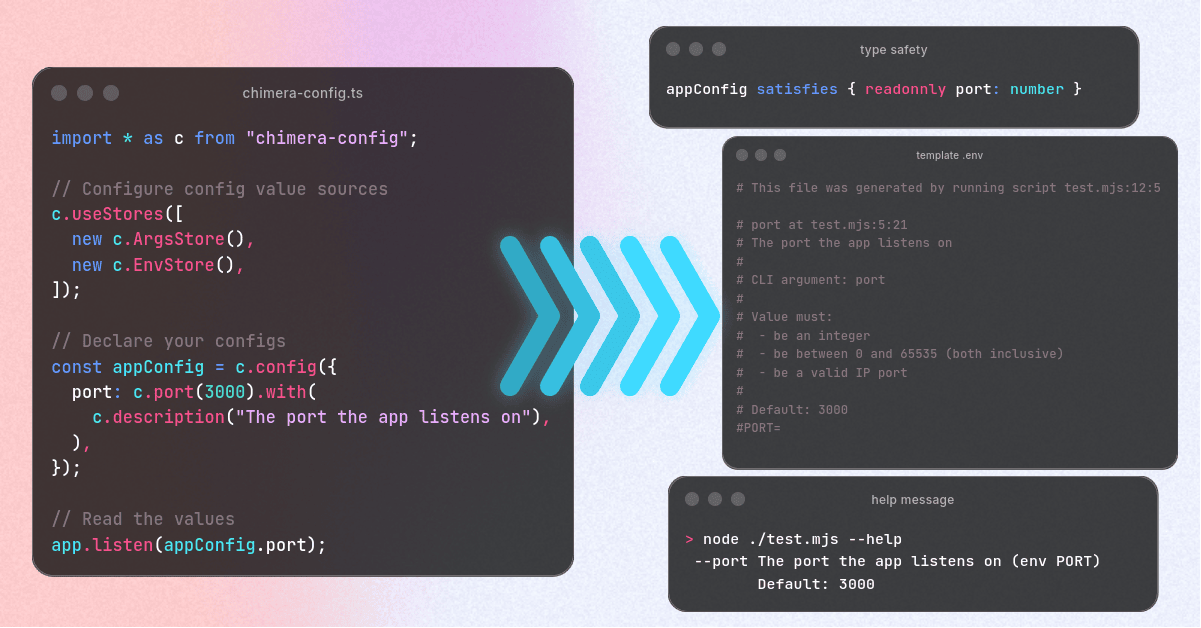
Every time I get to an existing project, I always have to wonder
- what configs are required to get started?
- how are config values defined? What are legitimate values for e.g. environment variables?
- how do I add my own config values? What patterns are currently being used?
And even when those questions are answered, it’s mostly always a matter of
type-casting the values. Especially when using process.env, everything is just
a string and you have to assume that the value can be parsed as number,
integer, JSON, etc.
Granted, I don’t always switch projects, but the lack of type-safety and missing documentation around those is still a pain-point in my day-to-day life.
Well, not anymore! Over the past couple of months I have been busy building
something that (in my humble opinion) is the best way to define and work with
configs: chimera-config.
This blog post is more on the background on why and how I implemented
chimera-config. If you are interested in API docs, visit the NPM
package or the
repo.Background
It all started when I was dabbling in Golang. Especially the flag
package. For those unaware, to define a CLI flag,
you simply declare it like so:
import "flag"

var port = flag.Int("port", 1234, "The port the app should run on");
With this simple line we
- define the name of the flag (
portin this case) - set a default value (
1234) - as well as add a help message.
Later on, when you call
flag.Parse()
the package parses all defined CLI arguments and updates all values accordingly.
This works, because flag.Int returns a pointer to an int, rather than an
int. That way the package is able to “patch” the value later on.
I love this solution, because it elegantly solves:
- declaring new flags is very easy
- new packages can very easily extend the app’s CLI interface, without having to
update
main.goor similar. - the package automatically handles parsing as well as generating the app’s help message for you. Properly documenting the code automatically documents the CLI args.
- type-safety is inherent to how you declare the flags.
And while Go’s flag package is limited to just CLI args, I thought, why not
extend this for arbitrary value sources? After all, what’s so special about CLI
args?
Another thought that kept me busy was, when I know where a function is called, then I would also gain deep insights into where which config is defined. That would allow me to not only print the documentation of a config, but also where it is defined. This is less important for end-user-apps, but crucial for development. When there is a config issue, be it local or on a deployment, I want to immediately know why, where, and maybe by whom a config was added and causing trouble. The more insight the better.
With those in mind, I defined some goals:
- Type-safety is the first and most important goal.
- I want to be able to attach metadata to configs. Like fallback values, a description, validators, etc.
- The config system should allow the users to set the source of config values. Multiple sources should also be allowed (e.g., first check the CLI args, then config files, then env vars).
- The config system should be able to track all configs defined in the app.
- Using the tracked defined configs, I want something that at least generates a
template
.envfile for me, since env variables are what we use the most. - The system should be extensible. Not only should you be able to add new
configs without modifying some global entry point (like the Go
flagpackage successfully does), developers should be able to add their own data sources, validators, etc. quite easily.
While this might look like a lot, we will see that JavaScript is a flexible enough language to allow me to implement each of those points.
Enter: chimera-config
Unlike other config libraries, chimera-config has two faces. One for defining
and reading config values. And the other for generating documentation from the
defined configs.
Part 1: Defining and Using Configs
So let’s start with the first part. This is best explained with a short example:
import * as c from "chimera-config";

export const appConfig = c.config({
  port: c
    .port()
    .with(c.fallback(3000), c.description("The port the app will listen on")),
});
If you are familiar with zod, then the code will look somewhat familiar to
you. Declaring configs is very similar to defining a “schema” of the config’s
shape. In the above case, we define a new variable named appConfig. This
variable is an object with a field named port. As you might have guessed, the
port must be an integer between 0 and 65535.
The type of the appConfig is therefore:
appConfig satisfies {
  port: number;
};
Using .with() allows you to modify the config field to your liking. In the
above example we attach a fallback value of 3000, when no config value was
passed. You can - and should - also add a description of the value. This will be
important when generating documentation for the config later.
In order to read the config values you very simply access the appropriate field:
import { appConfig } from "./app-config";

await server.listen(appConfig.listen);
I bet at that point you wonder, where chimera-config is reading the values
from. Well, this is up to you. By default, no stores are defined. Which means no
values will be found for any config. Which means either the fallback value will
be used, or an error is thrown if none is provided. To make use of a store, add
it to the default store used by all configs (unless otherwise specified):
import * as c from "chimera-config";

c.useStores([
  // First, read the CLI args
  new c.ArgsStore(),
  // Second, try to get values from `process.env`
  new c.EnvStore(),
]);
Configuring
chimera-configmust be done before any config values are read or (ideally) even defined. To prevent any issues, put the above code snippet in a separate file. Then import it at the very top. Like this:import "./setup-chimera-config"; // Add empty line to prevent code-formatters from moving the above import import { appConfig } from "./app-config"; const server = new Server(); await server.listen(appConfig.port);
“Okay”, you might ask, “but how does chimera-config config know what env
variable corresponds to what config value?”
Well, chimera-config uses your config “schema” in order to auto-generate
proper config names. In fact, the store decides, how to look up config values.
The EnvStore, for example, will try to resolve a value for a config with the
path ["port"]. It will then convert this path to UPPER_SNAKE_CASE, which
results in the env variable name PORT. The ArgsStore, on the other hand,
will get the same input to search for a value of the --port CLI argument.
Speaking of “path”, however, chimera-config does support multiple levels.
For example:
// You can optionally pass a "prefix" to all config fields
const dbConfig = c.config("db", {
  // For nesting you just nest objects
  connection: {
    host: c.string(),
    port: c.port(),
  },
  auth: {
    userName: c.string(),
    password: c.string(),
  },
});
This will generate env variables DB_CONNECTION_HOST, DB_CONNECTION_PORT,
DB_AUTH_USER_NAME, DB_AUTH_PASSWORD and CLI args --db-connection-host,
--db-connection-port, --db-auth-user-name, and --db-auth-password.
If you want, you can also override env variables by using.with(c.envVarName('OVERRIDE_NAME'))/.with(c.envVarAlias('ADDITIONAL_ALIAS')),.with(c.argName('--override-name'))/.with(c.argAlias('--additional-alias')), etc.
Part 2: Generating Documentation from Configs
As mentioned above, I want my config library to not only make using configs easier, it should also self-document along the way.
To achieve this, every call to c.config() will be tracked. That way
chimera-config knows where a config is defined (for those curious, via
Error.stack) as well as keeping all the metadata accessible.
This information can then be used to convert the metadata to human-readable
information. The most important one - for the projects I currently work in - is
generating a template .env file. But generating a --help message is also
supported. However, CLI args parsing is still a bit in the conception phase, so
it’s not as stable yet.
In order to generate a .env template, you can simply call
c.generateDotEnvTemplate(). To keep everything in one file, I’ll start a new
example:
import * as c from "chimera-config";

c.useStores([new c.EnvStore()]);

const appConfig = c.config({
  port: c.port().with(
    c.fallback(() => 3000),
    c.description("The port the app listens on"),
  ),
});

const externalServiceConfig = c.config("externalService", {
  apiKey: c.string().with(c.description("The API key to send via HTTP header")),
});

console.log(
  c.generateDotEnvTemplate({
    // Optional: Change the default header to your liking
    header: "# My fancy app",
  }),
);
Running the above code snippet yields this result:
# My fancy app

# port at test.mjs:5:21
# The port the app listens on
#
# Value must:
#  - be an integer
#  - be between 0 and 65535 (both inclusive)
#  - be a valid IP port
#
# Default: 3000
#PORT=

# externalService.apiKey at test.mjs:12:33
# The API key to send via HTTP header
EXTERNAL_SERVICE_API_KEY=
As you can see, chimera-config not only shows you what env variables you can
set, but will also print out as much information about those values as possible.
Starting with the location of each config. This should make it easy to find
where a config is defined, in case it has to be changed.
The second part of the output consists of the conditions a value must pass in
order to be a proper value. Those are extracted from any conditions you put on a
config field. Since c.port() is an alias for
c.integer().with(c.betweenIncl(0, 65535)), we get this information printed out
as well. c.port() furthermore adds another “value hint” via
.with(c.valueHint('be a valid IP port')), which you see as third point in the
list.
Since the port config has a default value, the user may not have to set it.
For this reason, the PORT env variable is printed, but commented out.
The EXTERNAL_SERVICE_API_KEY, however, has no default value set, since it is a
secret and must not be exposed in the code. As such, the developer has to set it
in order to use the service properly. Hence, it is not commented out and should
be filled in.
This feature is also the reason, why configs are always lazy-evaluated. If you want your app to fail early to catch any missing config values, you can simply callc.resolveAll(). You must ensure, however, that all configs are defined before calling this function though. Any configs that are defined afterc.resolveAll()was called will lazily evaluate.
If you want to use the ArgsStore, you can also generate help messages by
calling c.argsHelpTextBuilder(). If you run this for the above example, this
will be the output:
                     --port The port the app listens on (env PORT)
                            Default: 3000
 --external-service-api-key The API key to send via HTTP header (env EXTERNAL_SERVICE_API_KEY)
Caveats
No system is perfect and chimera-config is no exception.
First and foremost, this library is still under very active development. While I try not to introduce breaking changes, things might change, which may lead to different env variables or CLI arg names being generated.
One issue that is inherent to the way chimera-config works is that it uses
global state to track the configs. This can easily lead to issues, like setting
up chimera-config too late. Dynamically loaded modules via the import()
function or using the new import defer could lead to some configs not being
included in the generated documentation. Sadly, there is not much I can do from
inside the library to prevent those issues. The developer (so you) has to ensure
that all configs are defined at the right time when interacting with the global
state (e.g., generating the .env template or calling c.resolveAll())
Call To Action
If you’ve read this far, thank you!
If you want to find out more about the project, you can find it on npm and on GitLab.
At the time of writing this blog post, I’m still looking for help with:
- Finalize CLI args store - CLI args parsing is hard, even if I’m aiming for something that’s pretty basic, given the scope of this project.
- Generate + host some documentation platform. Currently I have tried to write every API into the README of the project. However, this doesn’t scale well and is not really searchable/queryable.
- New features like:
- Add support for
asyncconfigs (e.g. fetched from API) - Selectively disable caching of configs to re-evaluate them every time (e.g., when the value updates). That would be helpful when you have dynamic configs and don’t want to restart the app just to update its config.
- Related to the above point, have a system to react to changing configs in the consuming code (e.g., via events).
- Add support for